
Create Your Account
1
Sign Up
Go to adminest.com and click Get Started
2
Authenticate
Sign in with your email using our secure Auth0 authentication
3
Complete Profile
Add your name and timezone for personalized reminders
Send Your First Document
The easiest way to get documents into Adminest is via your personal document email address.1
Copy Your Document Email
On the Dashboard you’ll see Your Secure Document Email. Click Copy to grab it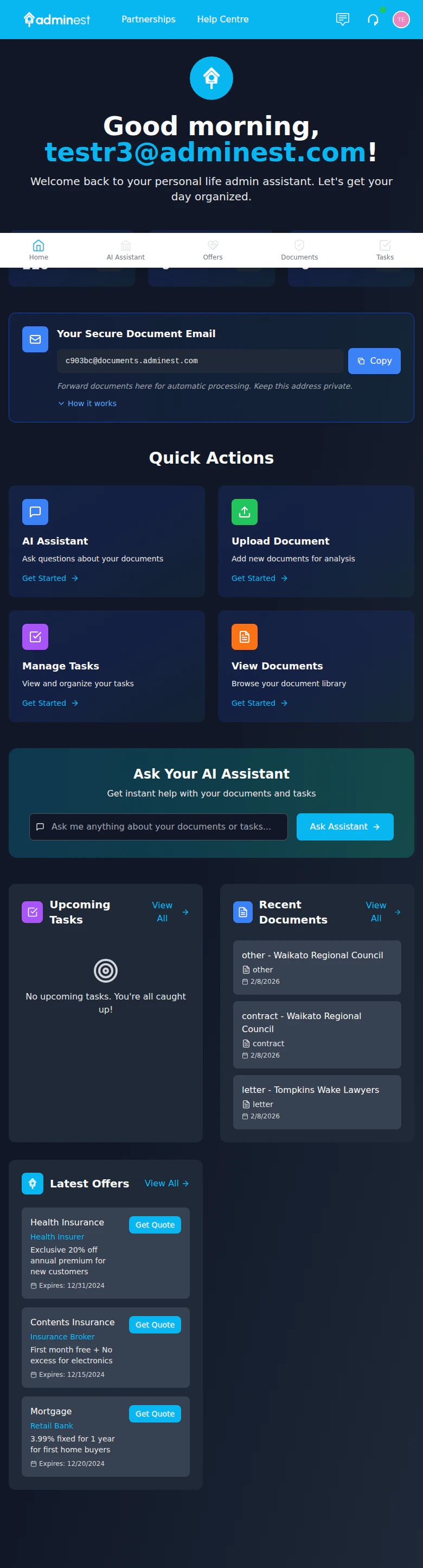
Your personal document email address is shown on the Dashboard
2
Forward a Document
Forward a bill, receipt, or letter to that address (PDF attachments work best)
3
Wait for AI Processing
Documents are automatically scanned and categorised within about 30 seconds
4
Review Tasks and Reminders
Check the AI-extracted tasks: due dates and reminders are created for you
1
Go to Documents
Click Documents in the navigation sidebar
2
Upload
Drag and drop a PDF or image, or click Upload to browse
Enable Push Notifications (Optional)
Get notified on your phone or desktop when documents are processed:1
Open Notifications
Click the bell icon in the top navigation bar
2
Enable Push
Click Enable Push Notifications in the notification panel
3
Allow in Browser
When your browser asks, click Allow to receive notifications
Push notifications are opt-in. You won’t be prompted automatically; enable them when you’re ready.
Connect Your Calendar (Optional)
Sync tasks to your calendar for reminders:1
Go to Settings
Click the Settings icon in the top right
2
Calendar Integration
Select Calendar from the settings menu
3
Connect
Choose Google Calendar or Microsoft Outlook and authorize access
What’s Next?
Document Management
Learn about document types and AI extraction
Task Management
Organize and track your tasks
AI Assistant
Chat with your documents
Connections
Share with family members