
Overview
The Adminest AI Assistant helps you find information across all your documents using natural language. Ask questions about your insurance coverage, find specific documents, or get summaries of important information.Natural Language
Ask questions in plain English
Document Context
AI searches across all your documents
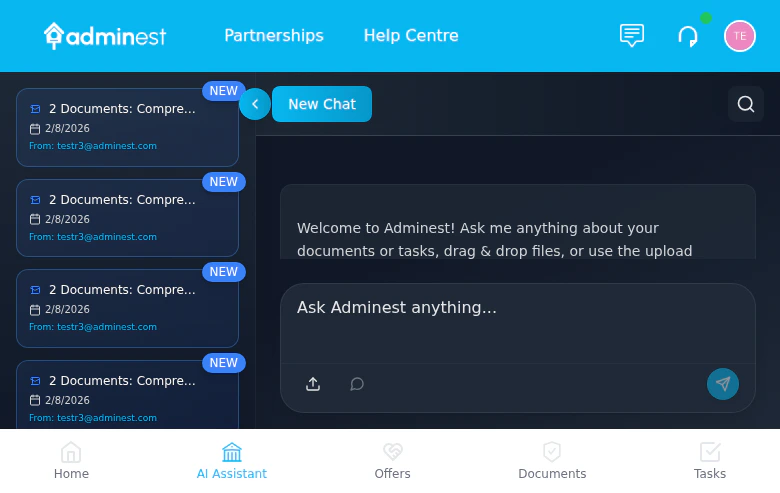
The AI Assistant with conversation history and real-time chat
Starting a Chat
1
Open AI Assistant
Click the AI Assistant button or chat icon
2
Ask a Question
Type your question in natural language
3
View Response
AI provides an answer with source references
4
Follow Up
Ask follow-up questions to dig deeper
What You Can Ask
Finding Information
“What is my car insurance policy number?”
“When does my home insurance expire?”
“How much did I pay for my last electricity bill?”
Summaries
“Summarize my health insurance coverage”
“What warranties are expiring this year?”
“Give me an overview of all my insurance policies”
Comparisons
“Compare my home and contents insurance policies”
“Which bills are due this month?”
Task-Related
“What tasks are overdue?”
“Show me all renewal reminders for this quarter”
How It Works
- Question Analysis - AI understands your intent
- Document Search - Relevant documents are identified
- Information Extraction - Specific details are pulled
- Response Generation - Clear answer with rich formatting including headings, lists, tables, bold text, and inline references
The AI only accesses documents you’ve uploaded to Adminest. It doesn’t have access to external information or the internet.
Tips for Better Results
Be Specific
“What’s my car insurance excess?” works better than “Tell me about insurance”
Use Document Names
Reference document types: “In my home insurance policy…”
Ask Follow-ups
Drill down with follow-up questions
Check Sources
Click source links to verify information
Source References
When the AI answers, it shows:- Which documents were used
- Direct quotes where applicable
- Links to view the source document
Limitations
The AI Assistant:- Only knows about documents you’ve uploaded
- Cannot make changes to documents or tasks
- May not understand very complex or ambiguous questions
- Works best with clearly scanned documents
AI Model Settings (Admin)
Administrators can optimize AI costs via AI Settings in the Admin Centre sidebar:- Performance mode (default): All operations use the highest-quality model
- Economy mode: Simple tasks (search, classification) use a faster, cheaper model while complex tasks remain on the premium model
Privacy
Your conversations with the AI Assistant:- Are processed securely
- Are not used to train AI models
- Are not shared with third parties
- Can be cleared from your history
Related Features
Documents
Upload documents for AI to analyze
Tasks
AI can help find task-related info
Ask Adminest: talk with your assistant
Tap the microphone in the chat and choose Ask Adminest to start a live voice conversation. Ask anything about your own life admin (“what’s due this week?”, “when does the car insurance renew?”, “how much was the last power bill?”) and Adminest answers out loud, from your real documents and tasks. You can interrupt it mid-sentence, just like a person. Worth knowing:- Your voice is never recorded. Audio is processed live and discarded; only the text transcript is kept, as a normal chat you can delete.
- Captions are always on: everything said (both ways) appears as streaming text.
- Tasks are never created silently. If you mention something actionable, Adminest asks aloud first; nothing is added until you say yes.
- Sessions respect your AI privacy settings and daily AI limits, and last up to an hour.