Overview
Connections let you share documents with family members, caregivers, or trusted advisors. Once connected, you can share specific documents and collaborate on managing life admin together.Invite Family
Send invitations to connect
Share Documents
Choose what to share with whom
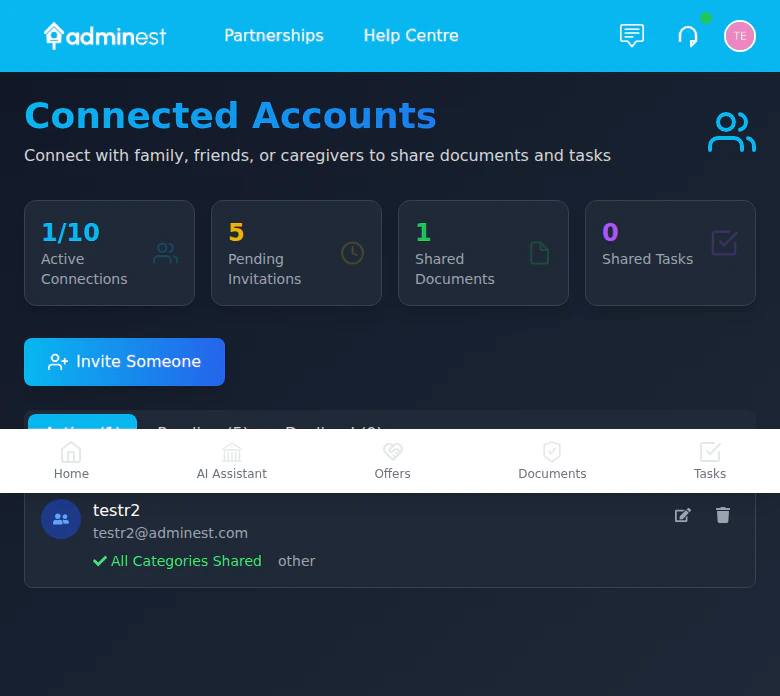
The Connections page showing active connections and sharing stats
Inviting Connections
1
Go to Connections
Click Connections in the navigation sidebar
2
Click Invite
Select the Invite Someone button
3
Enter Details
Add their email address and optionally their name
4
Choose Relationship
Select the relationship type (family, caregiver, advisor)
5
Add Message
Optionally include a personal message
6
Send Invitation
Click Send Invitation
The invited person will receive an email with instructions to create an Adminest account (if they don’t have one) and accept your connection.
Managing Invitations
Pending Invitations
View invitations you’ve sent that haven’t been accepted yet:- See when the invitation was sent
- Resend if needed
- Cancel pending invitations
Accepting Invitations
When someone invites you:- You’ll receive an email notification
- Log into Adminest
- Go to Connections > Pending
- Click Accept or Decline
Sharing Documents
Once connected, you can share specific documents:1
Open Document
Navigate to the document you want to share
2
Click Share
Select Share in the document actions
3
Select Connections
Choose which connections should have access
4
Set Permissions
View only - Can see document and details
Manage - Can also manage related tasks
5
Confirm
Click Share to grant access
Bulk Sharing
Share multiple documents at once:- Select documents using checkboxes
- Click Share Selected
- Choose connections and permissions
- Confirm
Managing Connections
View Connected Users
Your Connections page shows:- Active connections with access details
- What’s shared with each connection
- When the connection was established
Edit Sharing Settings
Modify what’s shared with a connection:- Click on the connection
- Select Edit Sharing Settings
- Add or remove shared documents
- Update permissions
Remove Connection
1
Go to Connections
Open your Connections page
2
Find Connection
Locate the person you want to remove
3
Click Remove
Select Remove and confirm
Co-Managing Shared Content
Documents shared with you by connected users appear automatically on your Documents page alongside your own documents. Shared documents are marked with a purple Shared badge so you can easily identify them. What you can do with shared documents and tasks:- View, download, and manage document details
- Archive or delete shared documents
- Update categories on shared documents
- Complete, update, or delete shared tasks
- Sync shared tasks to your Google Calendar
- Select shared documents for bulk actions
When you modify shared content (e.g., complete a task or delete a document), the owner automatically receives a notification so both users stay in sync.
Connection Dashboard
The Connections page shows:Privacy & Security
Granular Control
Share specific documents, not everything
Revoke Anytime
Remove access instantly when needed
- Connections can only see documents you explicitly share
- Connected users can co-manage shared content
- Remove access at any time
- Audit log of who accessed what
Use Cases
Family Document Sharing
Family Document Sharing
Share insurance policies, warranties, and important documents with your spouse or partner so both can access when needed.
Elderly Parent Care
Elderly Parent Care
Help manage a parent’s documents and tasks. They share access with you so you can help track medical appointments and bill payments.
Financial Advisor
Financial Advisor
Share relevant financial documents with your accountant or financial advisor during tax season.
Related Features
Documents
Manage documents before sharing
Tasks
Shared documents can have shared tasks