> ## Documentation Index
> Fetch the complete documentation index at: https://docs.adminest.com/llms.txt
> Use this file to discover all available pages before exploring further.
# AI Assistant
> Chat with your documents and get intelligent, formatted answers.
## Overview
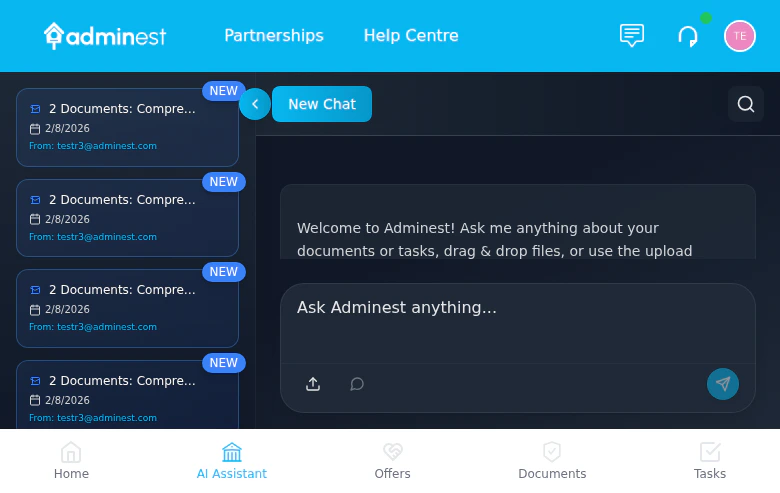
The Adminest AI Assistant helps you find information across all your documents using natural language. Ask questions about your insurance coverage, find specific documents, or get summaries of important information.
Ask questions in plain English
AI searches across all your documents
 ## Starting a Chat
Click the **AI Assistant** button or chat icon
Type your question in natural language
AI provides an answer with source references
Ask follow-up questions to dig deeper
## What You Can Ask
### Finding Information
> "What is my car insurance policy number?"
> "When does my home insurance expire?"
> "How much did I pay for my last electricity bill?"
### Summaries
> "Summarize my health insurance coverage"
> "What warranties are expiring this year?"
> "Give me an overview of all my insurance policies"
### Comparisons
> "Compare my home and contents insurance policies"
> "Which bills are due this month?"
### Task-Related
> "What tasks are overdue?"
> "Show me all renewal reminders for this quarter"
## How It Works
1. **Question Analysis** - AI understands your intent
2. **Document Search** - Relevant documents are identified
3. **Information Extraction** - Specific details are pulled
4. **Response Generation** - Clear answer with rich formatting including headings, lists, tables, bold text, and inline references
The AI only accesses documents you've uploaded to Adminest. It doesn't have access to external information or the internet.
## Tips for Better Results
"What's my car insurance excess?" works better than "Tell me about insurance"
Reference document types: "In my home insurance policy..."
Drill down with follow-up questions
Click source links to verify information
## Source References
When the AI answers, it shows:
* Which documents were used
* Direct quotes where applicable
* Links to view the source document
Always verify important information (like coverage amounts or due dates) by clicking through to the source document.
## Limitations
The AI Assistant:
* Only knows about documents you've uploaded
* Cannot make changes to documents or tasks
* May not understand very complex or ambiguous questions
* Works best with clearly scanned documents
AI responses are for informational purposes. Always verify critical details with the original documents, especially for insurance claims or legal matters.
## AI Model Settings (Admin)
Administrators can optimize AI costs via **AI Settings** in the Admin Centre sidebar:
* **Performance mode** (default) — All operations use the highest-quality model
* **Economy mode** — Simple tasks (search, classification) use a faster, cheaper model while complex tasks remain on the premium model
This setting does not affect the quality of document analysis or task extraction, which always use the premium model. Changes take effect immediately across all AI operations.
## Privacy
Your conversations with the AI Assistant:
* Are processed securely
* Are not used to train AI models
* Are not shared with third parties
* Can be cleared from your history
## Related Features
Upload documents for AI to analyze
AI can help find task-related info
## Starting a Chat
Click the **AI Assistant** button or chat icon
Type your question in natural language
AI provides an answer with source references
Ask follow-up questions to dig deeper
## What You Can Ask
### Finding Information
> "What is my car insurance policy number?"
> "When does my home insurance expire?"
> "How much did I pay for my last electricity bill?"
### Summaries
> "Summarize my health insurance coverage"
> "What warranties are expiring this year?"
> "Give me an overview of all my insurance policies"
### Comparisons
> "Compare my home and contents insurance policies"
> "Which bills are due this month?"
### Task-Related
> "What tasks are overdue?"
> "Show me all renewal reminders for this quarter"
## How It Works
1. **Question Analysis** - AI understands your intent
2. **Document Search** - Relevant documents are identified
3. **Information Extraction** - Specific details are pulled
4. **Response Generation** - Clear answer with rich formatting including headings, lists, tables, bold text, and inline references
The AI only accesses documents you've uploaded to Adminest. It doesn't have access to external information or the internet.
## Tips for Better Results
"What's my car insurance excess?" works better than "Tell me about insurance"
Reference document types: "In my home insurance policy..."
Drill down with follow-up questions
Click source links to verify information
## Source References
When the AI answers, it shows:
* Which documents were used
* Direct quotes where applicable
* Links to view the source document
Always verify important information (like coverage amounts or due dates) by clicking through to the source document.
## Limitations
The AI Assistant:
* Only knows about documents you've uploaded
* Cannot make changes to documents or tasks
* May not understand very complex or ambiguous questions
* Works best with clearly scanned documents
AI responses are for informational purposes. Always verify critical details with the original documents, especially for insurance claims or legal matters.
## AI Model Settings (Admin)
Administrators can optimize AI costs via **AI Settings** in the Admin Centre sidebar:
* **Performance mode** (default) — All operations use the highest-quality model
* **Economy mode** — Simple tasks (search, classification) use a faster, cheaper model while complex tasks remain on the premium model
This setting does not affect the quality of document analysis or task extraction, which always use the premium model. Changes take effect immediately across all AI operations.
## Privacy
Your conversations with the AI Assistant:
* Are processed securely
* Are not used to train AI models
* Are not shared with third parties
* Can be cleared from your history
## Related Features
Upload documents for AI to analyze
AI can help find task-related info